A friend mentioned today that it hurts when someone uses your photos and don't give you the credit for it. I completely understand his feelings. It happened with me. It happens with everybody!
There are many tools available to add watermarks to your photos. Here I'm going to tell you how to do it using Picasa. Because that's what I use!
You have to think about adding a watermark(some copyright) only when you are sharing the photo with others. Using Picasa you can share photos with others mainly in two ways. By uploading them to a web album and sharing the link, or by exporting the photos to a folder.
We will see how to add watermark to your photos in both these cases.
- How to add watermarks while uploading photos to Picasa Web Album
- Open Picasa
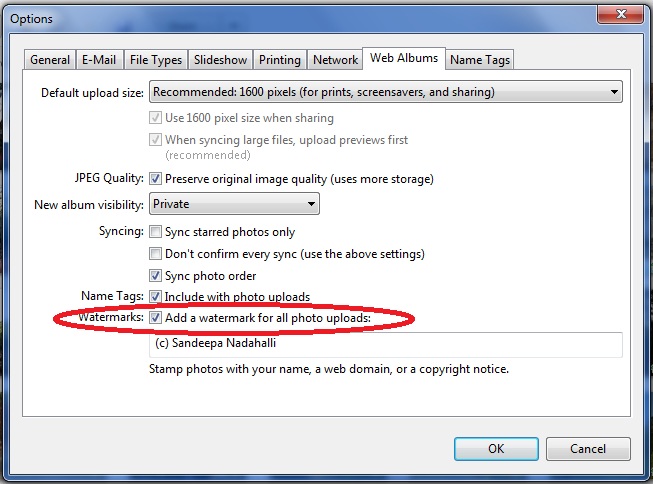
- Goto Tools -> Options -> Web Albums
- In the dialog that pop's up,(see image below) select the check box for Watermarks.

- Enter the text for your water mark in the text box given. As you can see in the screenshot, I use "(c) Sandeepa Nadahalli".
- Click OK to exit the settings dialog. Your photos will be watermarked with the given text when you upload them.
- How to add watermarks while exporting photos from Picasa.
- Select the photos or Album you want to export
- Goto File -> Export Picture to Folder

- Select the check box next to Watermark:
- Enter the text to be used for watermarking.
- Click on the export button!