Google+ Sandeepa On Life

Pages

Search this blog

Friday, September 16, 2011

BSNL Offers

Today I got an email from BSNL Bangalore about BSNL Mela to be held for 3 days starting Tomorrow. Sharing it here for the benefit of readers.

The email goes like this.. 
Dear Customer ,
Bangalore Telecom District is organizing Mela on 17,18,19th September 2011 at our Customer Service Centers
Kindly visit nearest Customer Service Center For Promotional Offers

Assuring you of our best services at all times.

Best Regards,
Bharat Sanchar Nigam Limited
Bangalore Telecom District


And here's the attachment from email giving the details of the offers.


*******************************************************

                  Related Links

Wednesday, September 14, 2011

Nokia 'Create For Millions' Contest

Nokia recently added regional contests and prizes to it's 'Create for Millions' contest.
According to a news post on Nokia Developer News:
Nokia’s Create For Millions contest for Series 40 developers has just added regional contests with local prizes: ChinaIndonesia, the Levant(Jordan, Lebanon, Iraq, Palestinian Territories, and Sudan), and West Africa. More regional contests are coming soon, too. Prizes for the regional contests include cash of up to 50,000 euros, as well as Nokia marketing and other promotions. read more..
The Create for Millions contest features four categories where you can bring out your best work for Nokia's latest Series 40 phones:

  1. In the Know - we're seeking your Series 40 web apps focusing on news and location-based information.
  2. Fun & Games - we're eager to try your Series 40 games and entertainment apps (either Java-based or web apps) that will fill those spare moments during the day with amusing, unforgettable diversions.
  3. Emotional Closeness - this is your chance to submit social networking apps that are developed either as Series 40 Java apps or web apps.
  4. Access to Knowledge - we want your life improvement apps (e.g., education, health, etc.), and in this category we'll accept either Series 40 Java apps or web apps, too.
The deadline to enter the Create for Millions contest has been extended to 1 November 2011


For more details on the contest, visit contest home page. Good luck!

Saturday, September 10, 2011

Test post, ingnore

R5BVNC85ENY5

Jnana Fellowship 2011 Provisional Merit List


Karnataka Jnana Aayoga(http://www.jnanaayoga.in) recently announced the provisional merit list for it's Jnana Fellowship 2011 program.

According to their site, the criteria used for shortlisting the candidates are:
(weightage in bracket)


  • Educational qualification (10)
  • Kannada language proficiency (10)
  • Work experience (15)
  • Answers to descriptive questions (20) (given in the application)
  • Written test-analytical 30; general personality 15 (conducted on August 21, 2011)
  • Submission of original documents for verification.
You can visit their website to download the Jnana Fellowship Merit List. Or you can click here.


Related Links

Sunday, August 14, 2011

Karnataka Jnana Ayoga Announces Eligibility list for Jnana Fellowship 2011

Karnataka Jnana Ayoga on 12th August 2011 announced the list of eligible candidates for its Jnana Fellowship 2011 program.

Click here to download the spreadsheet containing name and other details of shortlisted candidates. The official announcement of the result can be found here.

Background

Karnataka Jnana Ayoga(KJA) had called for applications for its Jnana Fellowship Program 2011. Best part was that you could apply for the fellowship online!

What next?

  • After processing the applications, the KJA as announced the list of eligible candidates.
  • If you had applied and you are shortlisted, the start preparing for verification of documents.
    • When:
       August 21st 2011 at 9 AM
    • Where:
      Government R.C. College of Commerce and Management, Basaveshwara Circle, Palace Road, Bangalore-560 001
    • What documents:
      • All Marks Cards (SSLC; PUC/Diploma; Graduation(all semesters); Post Graduation(all semesters); Certificate of M Phil; Ph.D. etc.,)
      • Offer Letter of Current Job and related documents
      • Work Experience Certificates
      • Address Proof in Candidate's Name (Electricity/Water/Phone Bill; Voter ID; Ration Card; Bank Passbook with One Year of Recent Statement; Passport)
      • Computer Education (if any)
      • 3 passport size recent photographs.
  • Keep visiting KJA website for more information and updates about the program.

Some useful links

Related Links

Monday, August 8, 2011

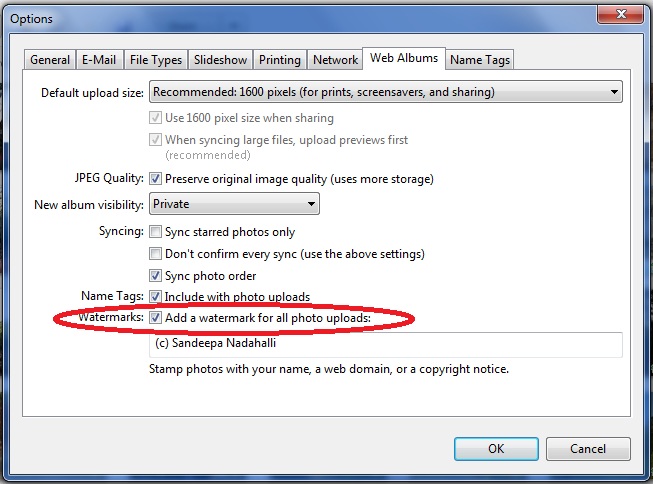
Picasa: How to add watermarks to photos

A friend mentioned today that it hurts when someone uses your photos and don't give you the credit for it. I completely understand his feelings. It happened with me. It happens with everybody!

There are many tools available to add watermarks to your photos. Here I'm going to tell you how to do it using Picasa. Because that's what I use!

You have to think about adding a watermark(some copyright) only when you are sharing the photo with others.  Using Picasa you can share photos with others mainly in two ways. By uploading them to a web album and sharing the link, or by exporting the photos to a folder.

We will see how to add watermark to your photos in both these cases.


  1. How to add watermarks while uploading photos to Picasa Web Album
    1. Open Picasa
    2. Goto Tools -> Options -> Web Albums
    3. In the dialog that pop's up,(see image below) select the check box for Watermarks.


    4. Enter the text for your water mark in the text box given. As you can see in the screenshot, I use "(c) Sandeepa Nadahalli".
    5. Click OK to exit the settings dialog. Your photos will be watermarked with the given text when you upload them.
  2. How to add watermarks while exporting photos from Picasa.
    1. Select the photos or Album you want to export
    2. Goto File -> Export Picture to Folder
    3. Select the check box next to Watermark:
    4. Enter the text to be used for watermarking.
    5. Click on the export button!
Here is a photo with a watermark (from my Picasa Web Album ).

Friday, July 1, 2011

Aadhar: What you need to know about it

Aadhar is again in news these days. I did some quick search and have compiled this post to help you know more about Aadhar.
  1. So, what is Aadhar?
    Aadhar is Multipurpose National Identity Card or Unique Identification card (UID Card). Though the project name mentions the word 'card', currently there's no plan to issue a card. They will be issuing only Aadhar number.

  2. Will I get an Aadhar card?
    No! You will just get unique Aadhar number.

  3. What's the use of Aadhar number? Why should I apply for Aadhar number?
    One of the answers I found on the official Aadhar Faq Page says:
      Aadhaar means foundation , therefore it is the base on which any delivery system can be built. Aadhaar can be used in any system which needs to establish the identity of a resident and/or provide secure access for the resident to services/benefits offered by the system. Aadhaar can be used in the delivery of the following programs:
      • Food & Nutrition – Public Distribution System, Food Security, Mid Day Meals, Integrated Child Development Scheme.
      • Employment – Mahatma Gandhi National Rural Employment Guarantee Scheme, Swarnajayanti Gram Swarozgar Yojana, Indira Awaaz Yojana, Prime Minister’s Employment Guarantee Program
      • Education – Sarva Shikhsha Abhiyaan, Right to Education
      • Inclusion & Social Security – Janani Suraksha Yojana, Development of Primitive Tribe Groups, Indira Gandhi National Old Age Pension Scheme
      • Healthcare – Rashtriya Swasthya Bima Yojana, Janashri Bima Yojana, Aam Aadmi Bima Yojana
      • Other miscellaneous purposes including Property Transactions, VoterID, PAN Card etc.

  4. What documents are accepted as Proof Of Identity(PoI) for Aadhar?
    • Passport
    • PAN Card
    • Ration or PDS photo card
    • Voter ID
    • Driving Licence
    • Government Photo ID Card
    • NREGS Job Card
    • Photo ID issued by recognized Educational Institution
    • Arms Licence
    • Bank ATM card with photo
    • Photo credit card
    • Pensioner photo card
    • Freedom Fighter Photo Card
    • CGHS or ECHS Photo Card
    • Address Card  having Name and photo issued by Department Of Post
    • Certificate of Identity issued by Group A Gazetted Officer

  5. What documents are accepted as Proof Of Address(PoA) for Aadhar?
    • Passport
    • Bank Statement or Passbook
    • Post Office Account Statement or Passbook
    • Ration Card
    • Voter ID
    • Driving Licence
    • Government Photo ID Card
    • Electricity Bill not older than 3 months
    • Water Bill not older than 3 months
    • Telephone land line bill not older than 3 months
  6. Can I apply for Aadhar online?As of today(1st July 2011), you can not apply online for Aadhar.
  7. How/where can I apply for Aadhar number?They have not started issuing Aadhar number in all the cities. Call up Aadhar helpline number ask for your nearest location.
  8. Aadhar helpline number?Call 18001801947
    • What's the information asked when applying for Aadhar number?
      Name,  Date of Birth, Gender, Address, Parent/Guardian details (required for children, adults may provide), Contact details phone and email (optional)
      Biometric Information required: Photo, 10 finger prints, Iris
    • Where can I find more information about Aadhar?
    If you know more information/resources on Aadhar, please share it in comments.